
RFQ Quality Control for Smaller Teams
Large enterprises have compliance departments that review procurement documents. Specialists check that every RFQ includes required certifications, proper specifications, and organizational standards, and they catch mistakes before they become costly. Small and mid-sized organizations have usually worked without these safeguards.
Buyer24 brings enterprise-grade quality control to procurement teams of any size. It uses AI instead of additional headcount to run the kind of validation large enterprises invest heavily in. For a definition and background, see what RFQ validation is. Validation is one stage in a broader push toward automating the RFQ process from request to award, and it feeds directly into the complete guide to supplier quote management, since cleaner requests produce cleaner quotes to compare.
The Cost of Incomplete RFQs
You write an RFQ, select your suppliers, and click send. Three days later, responses start arriving. One supplier asks about quantities because you forgot to specify them. Another needs clarification on delivery requirements, and a third can't quote because the specifications are ambiguous.
Incomplete or unclear RFQs are a hidden cost in procurement. They're also one of the top reasons RFQs don't get answered on time. They cause:
- Delayed responses: Suppliers wait for clarification instead of quoting
- Incomplete quotes: Missing information means suppliers guess or skip line items
- Back-and-forth emails: Clarifications that should have been in the original request
- Missed deadlines: The procurement cycle extends while you sort out confusion
Many of these issues are common RFQ mistakes to avoid, and validation catches them before the RFQ is sent.
AI-Powered RFQ Validation
Buyer24 now includes AI validation that reviews your RFQs before they go out. It works as a second reviewer that does not get tired, checks every detail, and can fix issues automatically.
How It Works
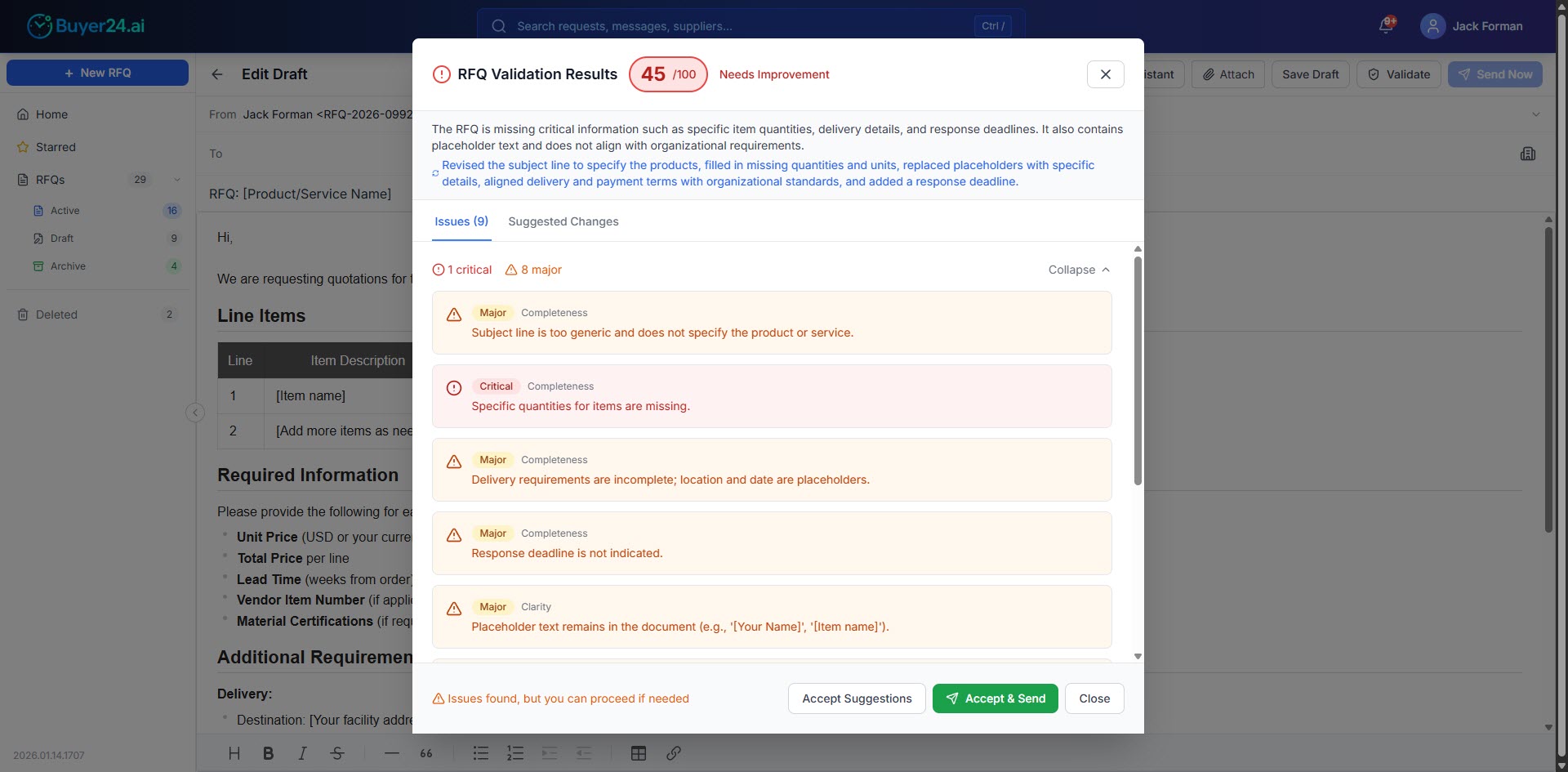
When you validate an RFQ (either manually or automatically before sending), the AI analyzes your request against established RFQ best practices and your organization's specific requirements. Within seconds, you get:
- Quality score: A 0-100 rating showing overall RFQ quality
- Issue detection: Specific problems identified by category and severity
- AI-suggested rewrite: A complete, improved version you can accept with one click
- Side-by-side comparison: See exactly what changed and why
What Gets Checked
The validation examines four key areas:
Completeness
- Is your subject line descriptive (more than "RFQ" or "Quote Request")?
- Are specific quantities included for all items?
- Have you specified delivery requirements?
- Is there a response deadline?
Clarity
- Are specifications unambiguous?
- Are units of measure specified for quantities?
- Is there any placeholder text remaining like "[Your Name]" or "TBD"?
Formatting & Structure
- Is the content well-organized with clear sections?
- Are you using paragraphs, lists, or tables instead of walls of text?
- Are line items formatted consistently?
Organization-Specific Rules
- Does the delivery address match your standard location?
- Are required certifications mentioned?
- Do payment terms align with your organization's preferences?
Suggested Rewrites
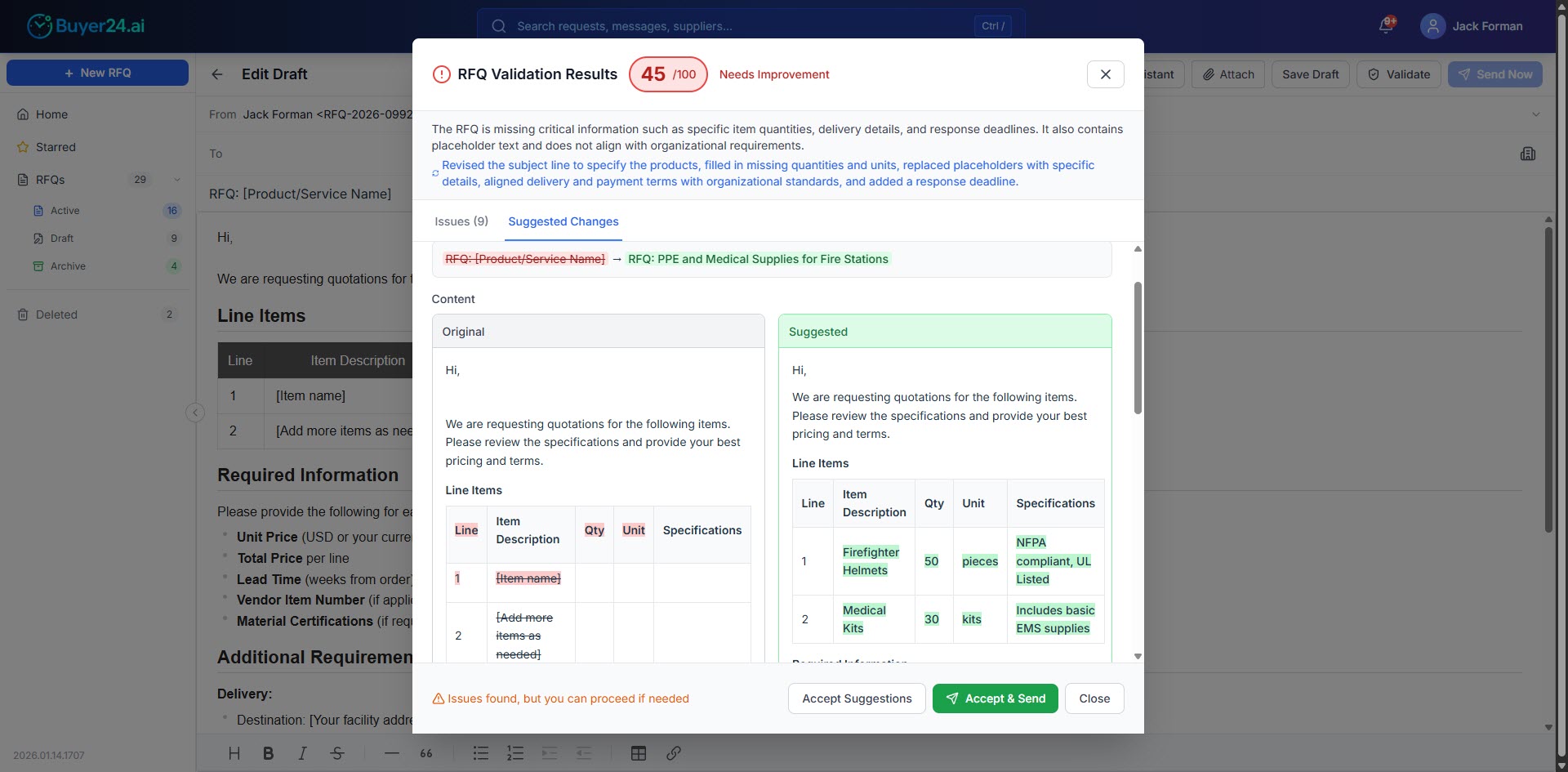
Many validation tools only report what is wrong. When Buyer24 finds issues, the AI also generates a complete rewritten version of your RFQ with all problems fixed.
Comparison View
The comparison view highlights differences between your original and the suggested version:
- Green highlights: Content that was added or improved
- Red highlights: Original content that was replaced
- Side-by-side or inline view: Choose the format that works for you
In the example above, the AI:
- Replaced placeholder "[Product/Service Name]" with specific equipment details
- Added concrete quantities (50 pieces, 30 kits)
- Included proper specifications (NFPA compliant, UL Listed)
- Turned a generic template into a ready-to-send RFQ
One-Click Acceptance
Click Accept & Send to apply the suggested changes and send your RFQ immediately, or click Accept Suggestions to review the changes in your editor before sending.
Validation Modes
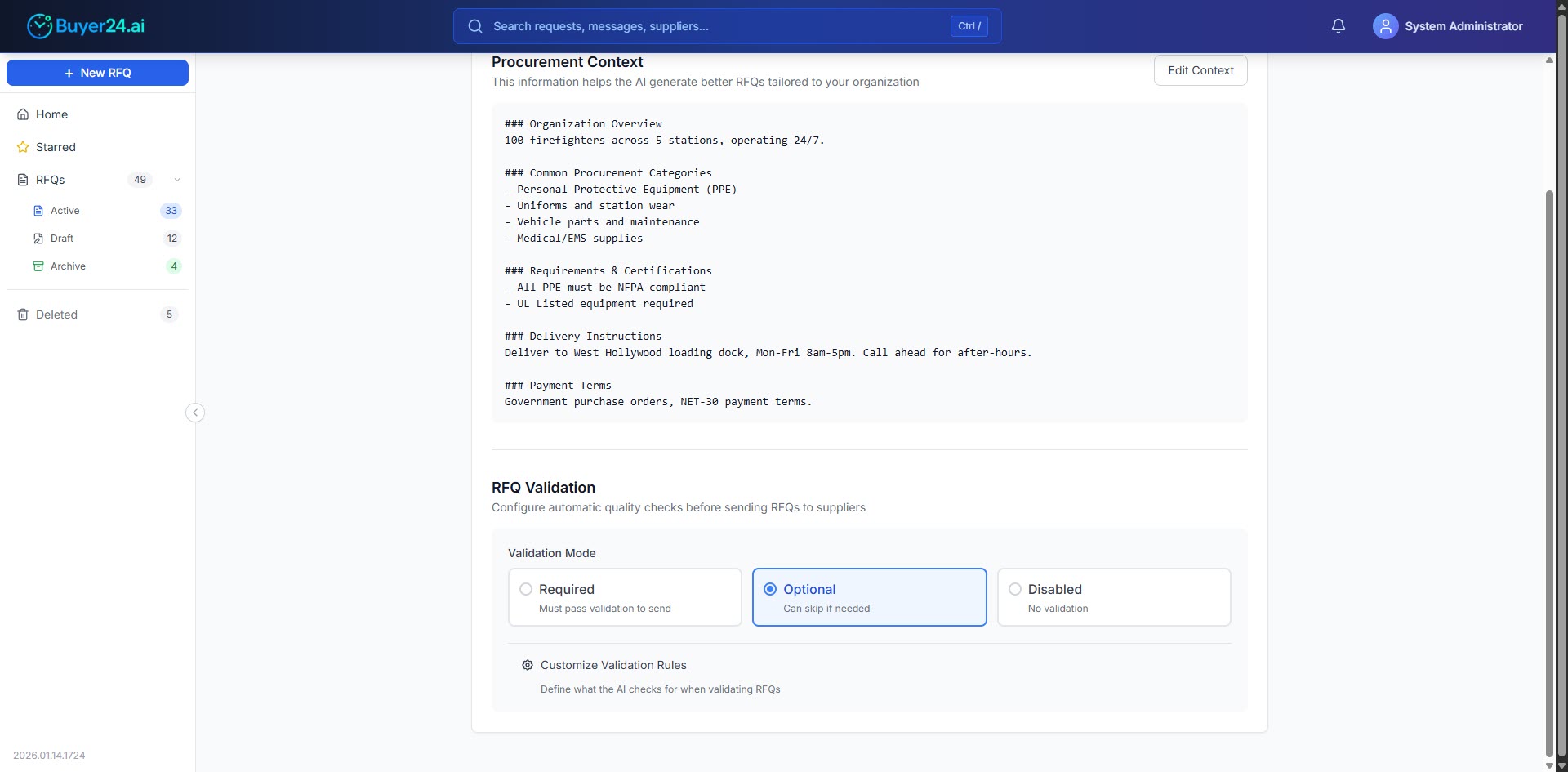
Some organizations require strict quality control and others prefer a lighter touch, so Buyer24 offers three modes.
Required Mode
Every RFQ must pass validation before sending. If critical issues are found, the request is blocked until they're fixed. This suits organizations with strict compliance requirements or complex procurement processes.
Optional Mode
Validation runs and shows issues, but users can choose to send anyway. This suits teams that want guidance without hard stops, or urgent requests that need to go out despite minor issues.
Disabled Mode
There is no automatic validation, and users manage quality control manually. Some teams handle validation through other processes or do not need it in their workflow.
Customize Your Validation Rules
A fire department needs UL-listed equipment and NFPA compliance. A manufacturing company cares about tolerances and material certifications. A consulting firm focuses on scope definitions and milestone deliverables.
Buyer24 lets you customize exactly what the AI checks for.
Editing Validation Rules
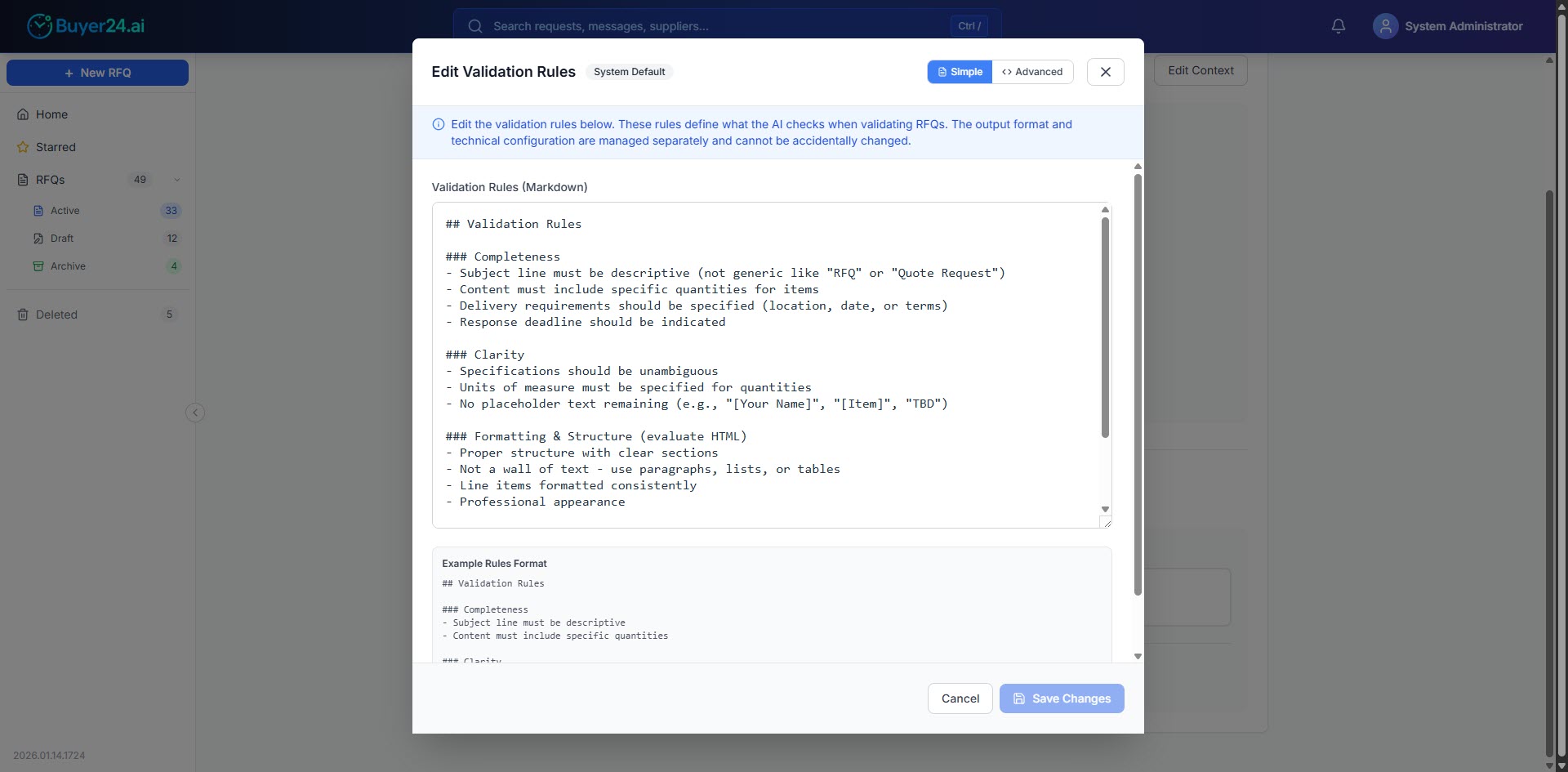
Organization admins can modify validation rules in simple markdown format. No coding is required; you describe what should be checked.
Example validation rules for a fire department:
Requirements & Certifications
- All PPE must be NFPA compliant
- UL Listed equipment required
Delivery Instructions
- Must specify loading dock location
- Include receiving hours
The AI uses these rules along with your organization context to validate RFQs appropriately. A generic "safety equipment" request will be flagged to include specific compliance requirements, because your rules say the organization needs them.
Context-Aware Validation
The validation engine has access to your organization's procurement context:
- Standard delivery addresses
- Common procurement categories
- Required certifications
- Payment terms
As a result, the AI checks generic best practices and also whether your RFQ matches how your organization operates.
Business Benefits
Compliance Review Without Dedicated Staff
Checks that used to require dedicated compliance staff are now automated. Organizations that could not afford a quality control department get a comparable review that is available 24/7 and improves with each product update.
Faster Supplier Responses
Complete RFQs get quoted faster because suppliers have the information they need upfront and do not have to ask questions, which shortens the procurement cycle.
More Accurate Quotes
Unclear specifications lead to quotes based on assumptions. Sometimes those assumptions are wrong, leading to change orders, renegotiations, or re-quoting. Clear RFQs get accurate quotes the first time. Once responses arrive, knowing how to vet and validate RFQ responses keeps quality control consistent for the rest of the process.
Reduced Administrative Overhead
Validation cuts the time spent on clarification emails and re-sending updated RFQs, so the upfront effort pays off quickly in less back-and-forth.
Consistent Quality Across Your Organization
Whether a senior procurement manager or a new hire sends the RFQ, validation keeps quality consistent, so your organization presents to suppliers at the standard of companies ten times your size.
Compliance Assurance
For organizations with regulatory requirements, including the public sector procurement teams that must document and defend every decision, validation checks that every request includes necessary compliance language, certifications, and documentation requirements. You set the rules once, and they are applied automatically to every RFQ.
Getting Started
RFQ Validation is available now for all Buyer24 organizations.
To enable validation:
- Go to Organization Settings
- Find the RFQ Validation section
- Choose your validation mode (Required, Optional, or Disabled)
- Optionally customize validation rules for your organization
To validate an RFQ:
- Create or edit your RFQ as usual
- Click the Validate button in the toolbar
- Review the results and suggested improvements
- Accept suggestions or make manual adjustments
- Send the RFQ
Tip: Validation also works with reusable RFQ templates. Every request based on a template is checked against your quality standards.
Summary
Enterprise-grade procurement tools used to be available only to organizations with enterprise budgets. Large companies had compliance departments, quality control processes, and teams dedicated to checking that every document met professional standards. AI is closing that gap.
Buyer24's RFQ Validation gives every organization access to the kind of quality control capabilities large enterprises invest heavily in. It requires no added headcount or complex processes. The AI catches mistakes, suggests improvements, and checks that every RFQ you send meets your organization's professional standards.
Enable RFQ Validation today to give your team enterprise-grade quality control, regardless of your organization's size.
FAQ
What is RFQ validation?
RFQ validation is an automated review of a request for quote before it's sent to suppliers. AI checks the document against best practices and your organization's rules, then scores quality, flags missing or unclear details, and suggests fixes. The goal is to catch issues before they reach suppliers and delay your sourcing cycle.
What does RFQ validation check for?
Validation examines four areas: completeness (quantities, deadlines, delivery requirements), clarity (unambiguous specs, units of measure, no placeholder text), formatting and structure (organized sections, lists, and tables), and organization-specific rules (delivery addresses, required certifications, payment terms). Each RFQ gets a 0-100 quality score with issues flagged by category.
How does RFQ validation help with compliance?
For regulated and public sector teams, validation checks that every request includes required compliance language, certifications, and documentation. You build your rules once, and the AI enforces them automatically on every RFQ. That consistency supports audit readiness and keeps quality uniform across both senior staff and new hires.
Can I customize validation rules for my organization?
Yes. Organization admins edit validation rules in simple markdown, no coding required. A fire department can require NFPA-compliant, UL-listed equipment; a manufacturer can require tolerances and material certifications. The engine also uses your procurement context, such as standard addresses and payment terms, to validate against how you actually operate.
Do I have to use validation on every RFQ?
No. Buyer24 offers three modes. Required mode blocks sending until critical issues are fixed, ideal for strict compliance needs. Optional mode shows issues but lets users send anyway. Disabled mode turns automatic validation off for teams that manage quality control another way.