
The Problem with Starting from Scratch
When you need to send out a request for quote (RFQ) for new materials, you usually start by drafting the email again. You open your last RFQ, copy-paste, modify the details, hope you didn't forget any important sections, and send.
This works, but it is slow, and inconsistency creeps in. One RFQ includes delivery requirements, another forgets them. One asks for pricing in a structured format, another leaves it open-ended. This leads to incomplete quotes, back-and-forth clarifications, and wasted time, and it is one of the main reasons RFQs don't get answered on time. Templates are one piece of a larger shift, and our guide on how RFQ automation works shows where they fit in the wider workflow.
Introducing RFQ Templates
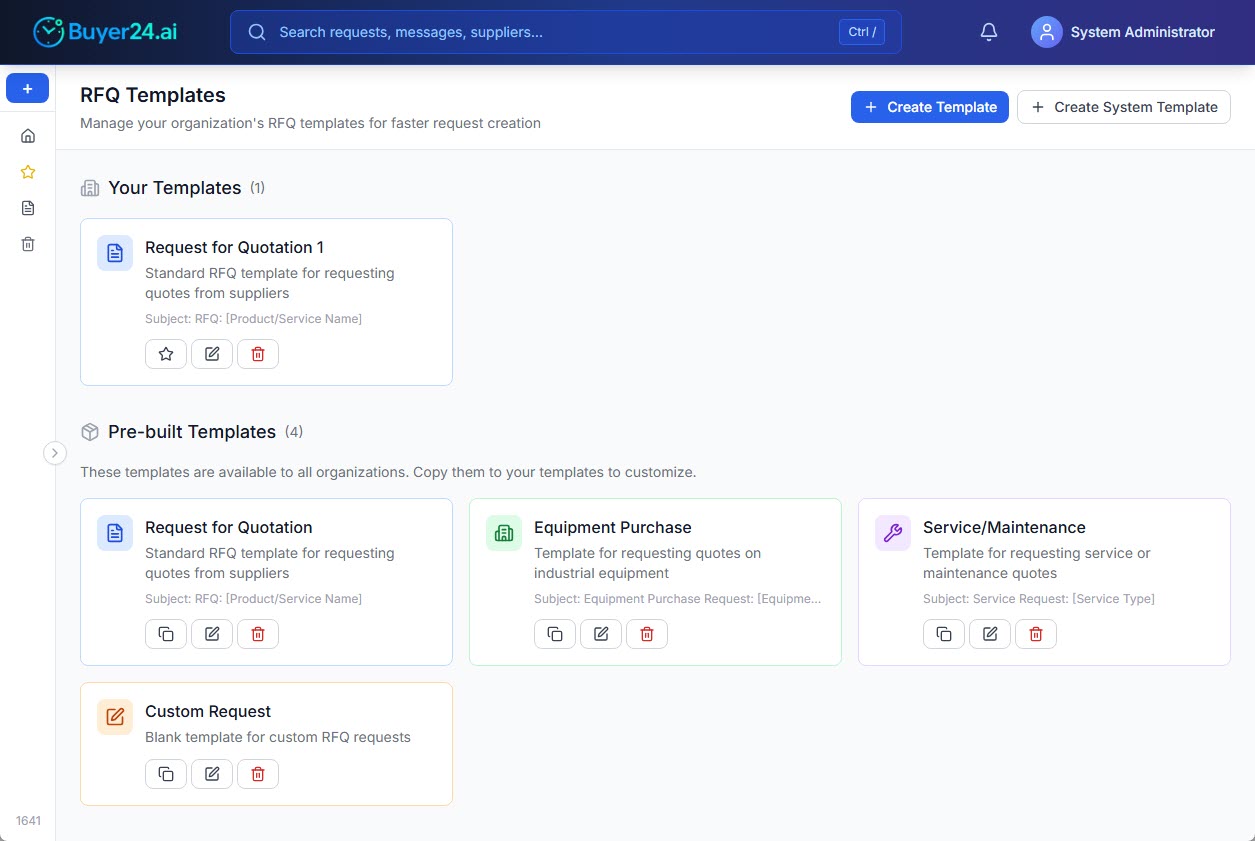
Buyer24 now lets you create and manage reusable RFQ templates that your entire team can use. Define your standard request formats once, and apply them instantly whenever you create a new procurement request.
Templates by Procurement Category
A manufacturer requesting raw materials has different requirements than a company sourcing IT equipment. With RFQ Templates, you can create templates tailored to your specific procurement categories:
- Standard RFQ: For general material and product requests
- Equipment Purchase: Detailed specifications for industrial equipment
- Service Requests: Maintenance, consulting, and professional services
- Custom Formats: Whatever your organization needs
Whatever the category, it helps to know what an RFQ template should include so no critical field gets left out. Each template includes:
- Subject line format: Consistent, recognizable subjects your suppliers expect
- Body structure: Pre-defined sections for specifications, quantities, delivery requirements
- Professional formatting: Tables, bullet points, and clear organization
Built-in AI Assistant
Writing a good RFQ template takes time and expertise, so the template editor includes an AI Assistant.
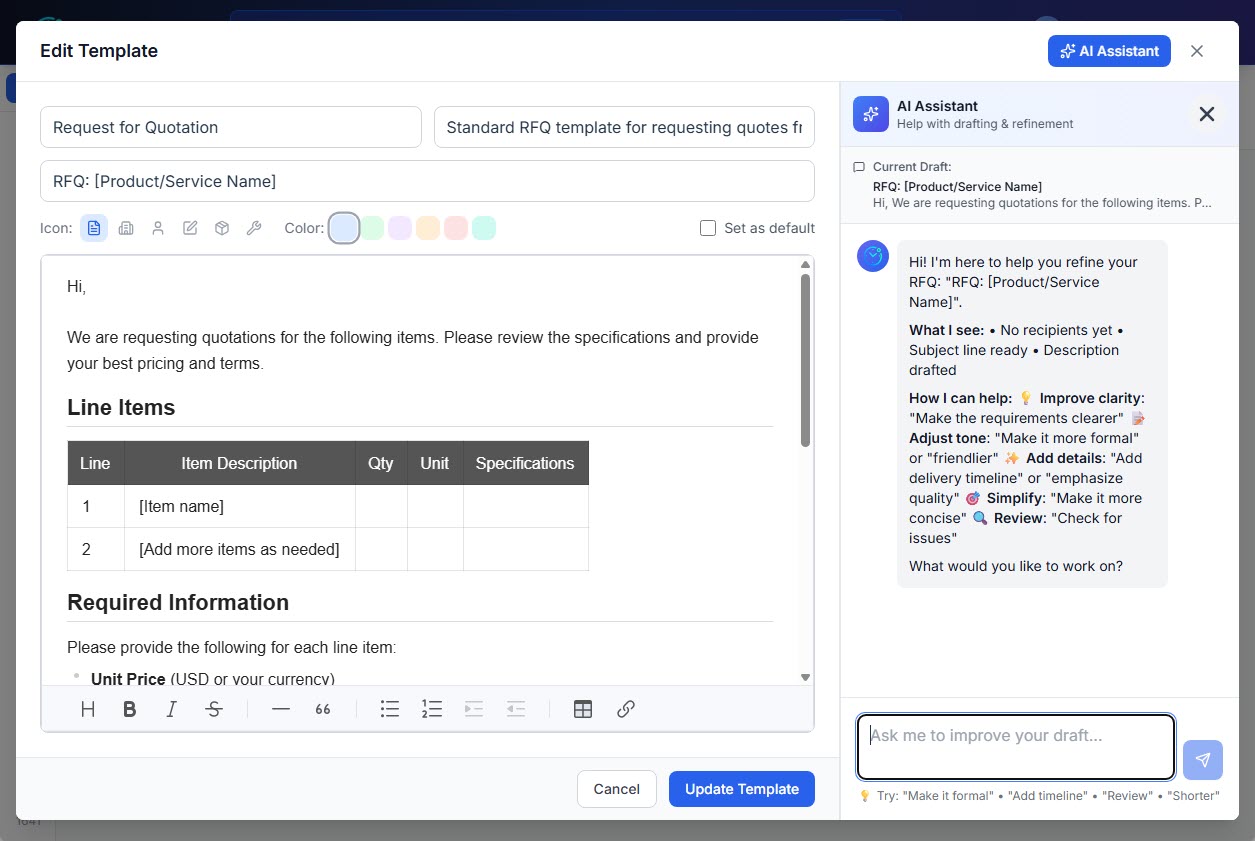
The AI Assistant can help you:
- Improve clarity: Make your requirements clear to avoid confusion
- Adjust tone: Make templates more formal for enterprise suppliers or friendlier for long-term partners
- Add important details: Ensure you're not forgetting delivery timelines, quality requirements, or payment terms
- Simplify: Remove unnecessary complexity that might slow down responses
- Review: Check for issues before you save
Describe what you need, and the AI refines your template in seconds. It works like a procurement writing expert on your team, guiding you through how to write an effective RFQ.
Pre-built Templates to Get You Started
Buyer24 includes pre-built templates based on procurement best practices:
- Request for Quotation. Standard material and product RFQs
- Equipment Purchase. Industrial equipment and machinery
- Service/Maintenance. Service contracts and maintenance requests
- Custom Request. Blank slate for unique needs
These templates are available to all organizations. Copy one to your templates and customize it to match your company's standards and requirements.
Benefits for Your Team
Consistency Across Your Organization
When everyone uses the same templates, your organization presents a unified, professional image to suppliers. Team members no longer have to decide which format to use or which details to include.
Faster RFQ Creation
Filling a saved template takes far less time than writing the request again. Select a template, fill in the specific details, and send. Your team can focus on strategic work instead of drafting emails.
Complete Requests, Better Quotes
Templates ensure you never forget to ask for important information. Include MOQ requirements, delivery timeframes, payment terms, and quality certifications every time. Suppliers respond with complete quotes, reducing back-and-forth. Pairing templates with AI-powered RFQ validation adds a final quality check that catches anything still missing before you hit send.
Easy Onboarding
New team members don't need to learn your RFQ format from scratch. The templates embody your organization's RFQ best practices, helping new hires work effectively from day one.
Getting Started with Templates
Templates are available now for all Buyer24 users with organization admin or procurement manager roles.
To create your first template:
- Navigate to Templates in your sidebar
- Click Create Template
- Define your subject line and body content
- Choose an icon and color for easy identification
- Save and start using it immediately
To use a pre-built template:
- Go to the Pre-built Templates section
- Click the copy icon on any template
- Customize it to match your organization's needs
- The template is now in your collection, ready to use
To apply a template when creating an RFQ:
- Start a new request
- Select from your available templates
- The subject and body are pre-filled instantly
- Modify the specific details and send
What Makes a Good RFQ Template
A strong RFQ template removes guesswork for both your team and your suppliers. It captures every detail a supplier needs to quote accurately on the first pass, which cuts down on clarification emails and incomplete responses. The best templates are specific enough to be useful and flexible enough to reuse across similar purchases.
A few elements belong in nearly every well-built template:
- A clear, recognizable subject line: Include the request type, your company name, and a short description (for example, "RFQ: Stainless Fasteners, Buyer24 Procurement"). Suppliers prioritize requests they can identify at a glance.
- Item specifications: Spell out materials, grades, dimensions, tolerances, and any standards or certifications. Vague specs are the most common cause of mismatched quotes.
- Quantities and units: State exact quantities, units of measure, and minimum order quantities (MOQ) so suppliers can price against real volumes.
- Delivery requirements: Include the delivery location, required date, and preferred Incoterms. Lead time is often as important as price.
- Pricing format: Ask for a structured breakdown (unit price, tooling, shipping, taxes) so quotes are directly comparable side by side.
- Payment terms: Note expected terms such as Net 30 or any deposit requirements upfront.
- Response deadline and contact: Give a firm quote-by date and a named point of contact for questions.
Keeping these fields consistent across every request makes comparison faster and signals professionalism to suppliers. For more on structuring requests, see what an RFQ template should include.
Summary
RFQ Templates ensure that every request your organization sends reflects your professional standards, without inconsistent formats, forgotten requirements, or time spent on repetitive drafting.
Combined with automatic email translation, your templates can reach suppliers worldwide in their native language while keeping your structure intact.
Start building your template library today.
FAQ
What should an RFQ template include?
A complete RFQ template should include a clear subject line, detailed item specifications (materials, grades, tolerances, certifications), exact quantities and units, delivery requirements with dates and Incoterms, a structured pricing format, payment terms, and a firm response deadline with a named contact. These fields ensure suppliers return complete, comparable quotes on the first try.
What does a good RFQ email template look like?
A good RFQ email template opens with a recognizable subject line, a brief context line, then organized sections for specifications, quantities, delivery, and pricing format. It closes with a quote-by date and contact details. Buyer24 templates pre-fill the subject and body structure, so you only add the specific details before sending.
How much time do RFQ templates actually save?
Drafting an RFQ from scratch takes time on every request. With a reusable template, you select the format, fill in the specifics, and send in seconds. Across a busy procurement team running dozens of requests weekly, that adds up to hours saved while also improving consistency and quote quality.
Can a template work for different procurement categories?
Yes. Buyer24 lets you create separate templates for standard material requests, equipment purchases, service contracts, and custom needs. Each can carry its own specification fields and tone, so a request for industrial machinery looks different from a routine consumables order while still following your organization's standards.