
Choose your next platform on evidence, not on the best demo.
Run an ERP, B2B commerce or systems integrator selection in Buyer24: one workbook for every vendor, every fact with its source and proof, and your team's ratings in one place. Your team makes the decision.
Must-have · contract prices per customer
What each vendor has proven
Vendor AL4
Proven hands-on, with your data
Yes
Vendor B
Confirmed in writing, add-on at a stated price
Partly
Vendor C
Marketing page only, not confirmed
Ask
Every answer links to its source · Illustrative
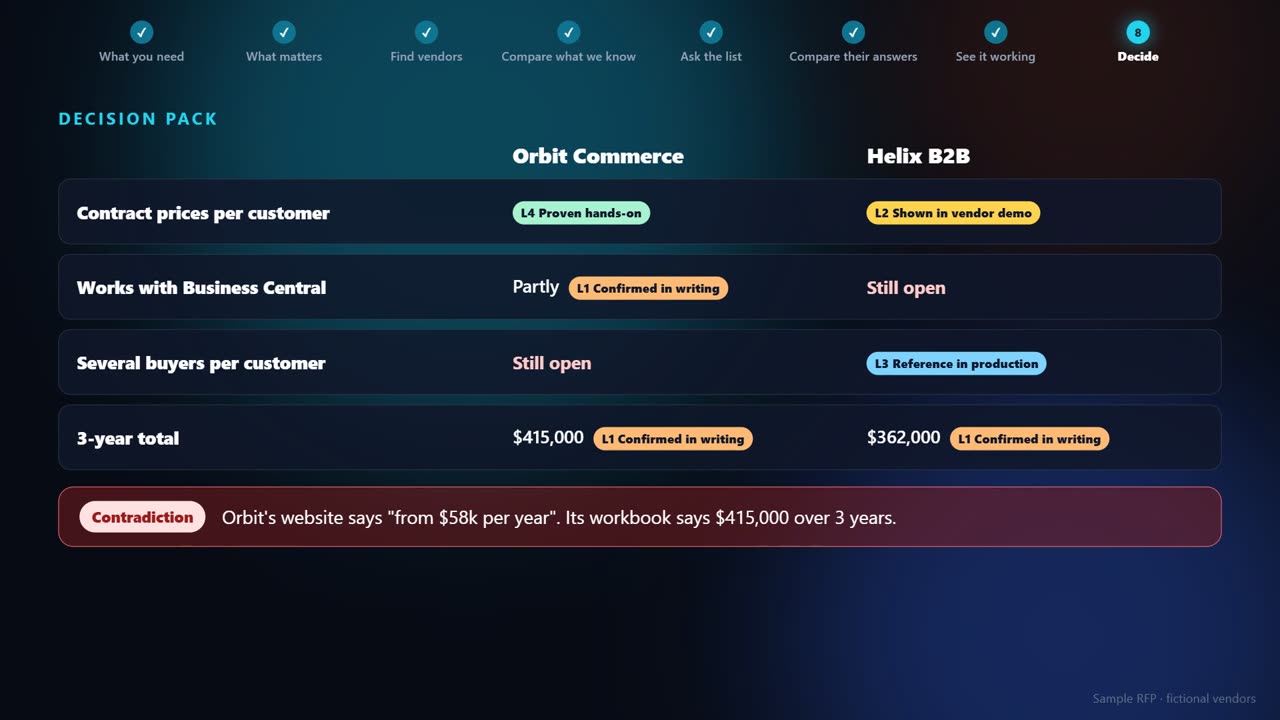
Every fact shows where it came from and how well it's proven, from a vendor's marketing page to a test with your own data.
One response workbook for everyone. Vendors reply by email with no login, and their answers are recorded for you.
With AI, a missing feature is quick to build, so the RFP asks how changes get deployed and what each gap costs. It adjusts to you: a traditional selection where the vendor runs it, or a new one where your team builds on it.
How a vendor selection runs in Buyer24
- One workbook to every vendor, no login
- Every fact with its source and how well it's proven
- A decision pack for your team, and no winner picked for you
A years-long decision, made from a spreadsheet.
Choosing a new ERP or B2B commerce platform is a decision you live with for years, and most companies make it only once or twice. The usual options are a consultant, an analyst subscription, or a spreadsheet and a run of demos.
The spreadsheet is where it falls apart. Vendor claims, written answers and demo impressions end up in the same cell, so nobody can say which answers were actually proven, and the decision goes to whoever gave the best demo.
Where the time goes
Marketing dressed as answers
"Yes" on a website and "yes" on your data look the same in a spreadsheet
Vendors answering differently
Different questions and formats, so nothing lines up side by side
Gaps with no price
"Possible" can mean a setting, a partner add-on or a paid build
Team opinions
Scattered through email threads and meetings
Demo notes
Hard to find when someone asks who showed what
You plus a team of AI agents
B2B commerce platform, ERP system or solution provider. It brings the steps, questions, requirements and criteria, and you can change any of them.
Build the long list and have an agent read each vendor's public pages. Every claim is recorded with its source, and nobody is contacted yet.
One workbook by email, the same for every vendor. Replies land in one inbox and their answers become facts, side by side.
Run your tests, score demos from their transcripts and collect your team's ratings. The decision pack shows what's proven, what's open and what it costs.
Built for one big decision
One workbook, no vendor login
Every vendor gets the same response workbook by email and replies with it filled in. Their answers are recorded as facts on your RFP.
Every fact shows its proof
From marketing material and written confirmation up to shown in a demo, reference in production, proven hands-on and verified in code. You set the bar for what counts as proven.
Must-haves that mean something
A vendor's own written no takes them out. A no that only comes from a public page is flagged as a question to ask, so nobody is ruled out before they've been asked.
How a gap gets to yes
Configuration, a partner add-on, a build by the vendor, a build by you, or only a roadmap promise, with who, by when and at what price.
Your team rates from a link
Teammates get their own link by email to rate what matters and each finalist's demo. No account needed, and everyone's rating and notes roll up per item.
Demos scored from the transcript
Upload a demo transcript and an agent records what the vendor showed, with the moment it happened, so you can go back and check.
What we took from how selections are bought today
- A login is one more reason not to answer
- So vendors work from a spreadsheet and their own email.
- An AI summary isn't evidence
- So every fact keeps its source and says how well it's proven.
- "Has the feature" hides the cost
- So every gap says how it gets to yes, and at what price.
- Money from vendors colors the list
- So you pay for the software, and vendors pay nothing.
What a selection usually costs
Market figures are third-party estimates, not quotes, and vary by scope. Buyer24 pricing is on the pricing page; how it works is in the help docs.
Questions we get
What does preview mean?
RFPs work end to end today, from the first brief to the decision pack, with three templates: B2B commerce platform, ERP system and solution provider. We're still adding templates, and pricing may change. On the Organization plan, your account manager helps you with your first project.
What does it cost?
RFPs are included in the Organization plan and enterprise agreements. Organization is $149 per seat a month, billed annually, with a minimum of 3 seats, so it starts at $5,364 a year for the whole platform. Vendor research and demo scoring run as agent tasks that use your plan's credits. Reading a vendor's workbook back doesn't. On another plan, you can open the finished sample and request access.
Can I look at it first?
Yes. Create a free account and open RFPs under Sourcing. You'll see a finished sample RFP with fictional vendors.
Does Buyer24 tell us which vendor to pick?
No. You get the facts side by side, how well each one is proven, what's still open and what it costs. The fit score is one computed fact among the others. Your team makes the decision.
Do vendors pay to be included?
No. Vendors don't pay Buyer24 to take part or to be compared, and there's no commission on what you buy.
Do vendors need an account?
No. They reply to your email with the filled workbook. Their replies land in the RFP's inbox, one thread per vendor.
Does anything go to vendors without us?
No. Nothing is sent until you choose to send it.
What if we're selecting something else?
Pick the closest template and change the questions, requirements and weights. Everything it brings is editable.